
Mii tab
The Mii tab edits everything in Mii.sav, the per-Mii data: name, personality, voice, food preferences, relationships, what’s in their pockets, what they’re wearing, and the troubles they’re currently in. Anything that belongs to a specific islander lives here, the island-wide state stays on the Player tab.
Once Mii.sav is loaded, the tab splits into sub-tabs across the top: Profile, Relationships graph, Housing, Belongings, Troubles, Habits, and Advanced.

Download Mii.sav
Section titled “Download Mii.sav”The orange Download Mii.sav button at the top of the tab writes a patched copy of your save to your Downloads folder. The editor never overwrites the file on disk, you do that yourself by putting the downloaded file back where you found it.
The button stays greyed out until you’ve made an edit, and lights up the moment something changes. You can keep editing and re-download as many times as you want, each download is the full current state.
Picking a Mii
Section titled “Picking a Mii”Every sub-tab except Relationships graph and Housing starts with a slot selector at the top. The dropdown lists every populated slot in Mii.sav as #index · name · Lv N, in save order. The selection follows you across sub-tabs, switching from Profile to Belongings keeps the same Mii in view.
Below the dropdown the selected Mii’s name, level pill, and XP bar give you a quick read of who you’re editing.
Profile
Section titled “Profile”The Profile sub-tab groups the identity and stat fields for one Mii into cards: Level, Identity, Wallet, Birthday, Personality, Mood, Food, Voice, Words, and the Relationships table at the bottom.
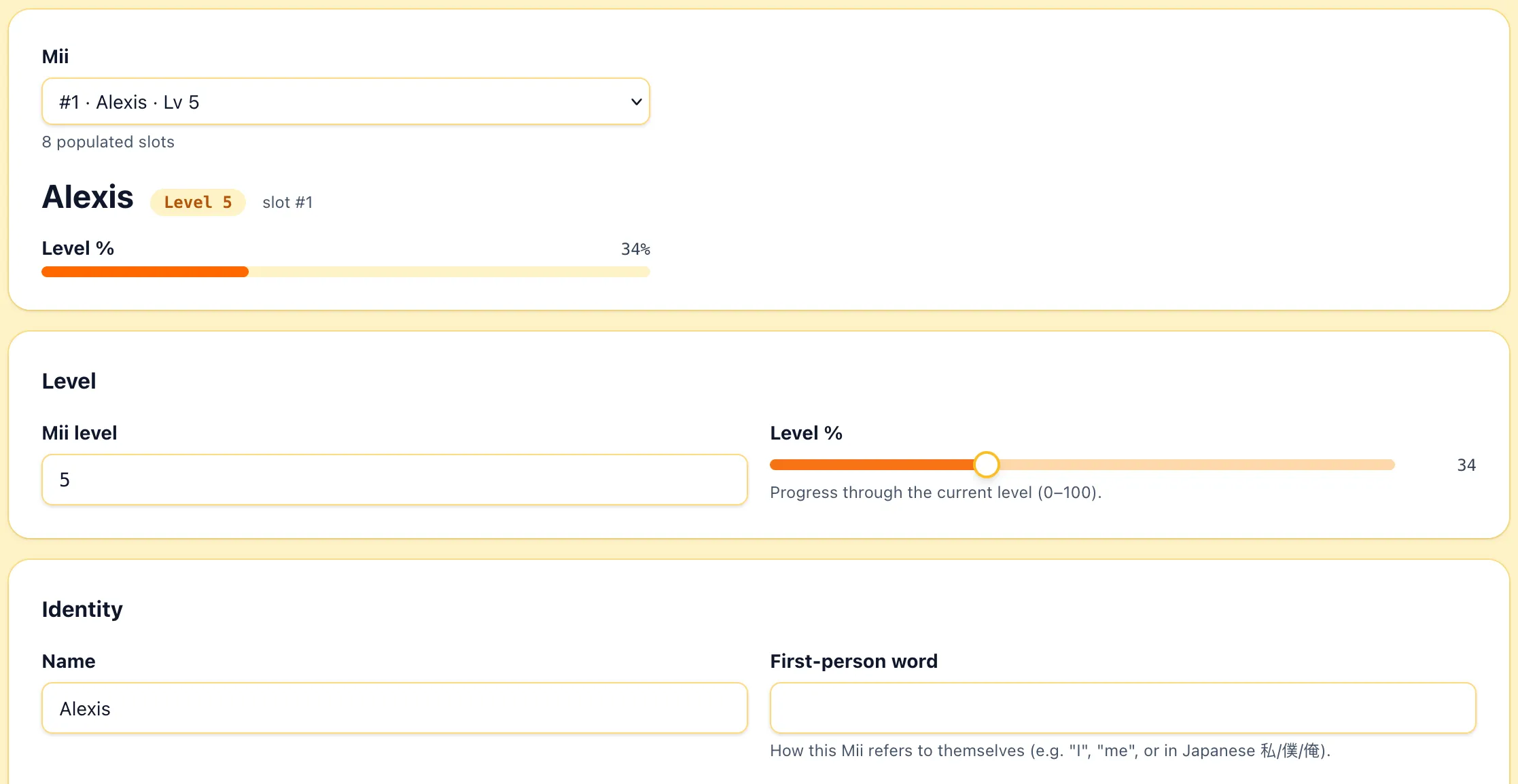
- Mii level is the in-game level, starting at 1.
- Level % is the progress slider through the current level.
Identity
Section titled “Identity”- Name, First-person word, and the two Pronunciation fields work the same way as on the Player tab. The first-person word is how the Mii refers to themselves (
I,me, or in Japanese私/僕/俺). - Third-person pronoun is how others refer to the Mii (
he/she/they). - Gender gates relationship.
- Attracted to is the gender or genders this Mii can fall for. Sweetheart and Spouse pairings require both Miis to be attracted to each other’s gender.
Wallet
Section titled “Wallet”- Money is this Mii’s personal wallet, separate from the player’s money on the Player tab. Often
0in early-game saves.
Personality
Section titled “Personality”Five axes drive the Mii’s behavior: Activeness, Audaciousness, Common sense, Gaiety, Sociability. The editor renders them as a single grid mapping the axes to the in-game labels (Energy, Movement, Overall, Speech, Thinking) with min/max captions (Flat/Varied, Slow/Quick, Normal/Quirky, Polite/Honest, Serious/Chill). A summary line at the top reads as Parent · Child, the same parent and child personality the game itself shows.
- Feeling is the current mood enum.
- Bond meter is the bond level with the player,
0to100.
- Stomach fullness is a slider,
0to100. - A Spoiler warning drawer hides the four favorite/hated food slots, All-time favourite, 2nd favourite, All-time hated, and 2nd hated. Open it only if you want to see or change those.
- Top ranked foods is the three foods the Mii currently rates highest, in order, updated as they try new foods.
- Foods tasted is the list of every food this Mii has ever been given.
Sliders for Preset type, Speed, Pitch, Formant, Tension, Intonation. Each slider runs 0 to 50 (51 steps).
Custom phrases this Mii speaks during dialogue. Each row is one phrase the Mii will use in cutscenes or while speaking.
Relationships
Section titled “Relationships”The Relationships table at the bottom of the Profile lists every recorded pair this Mii is in. Outgoing is how this Mii regards the other, incoming is how the other Mii regards this one.
Each row has:
- Other Mii is the partner in the pair.
- Outgoing type / Outgoing level, Incoming type / Incoming level.
- Crush is the directional crush flag, shown with an arrow pointing at the target.
- Fight? is whether the pair is currently fighting.
- Set on is when the current relationship type was set, the game uses this to drive day counters.
Some combinations the table blocks outright with a chip explaining why: Sweetheart and Spouse won’t apply to blood relatives, won’t apply when either Mii isn’t attracted to the other’s gender, and won’t apply when either is already paired. Crushes have similar rules and can’t coexist with a fight.
Acquaint with strangers sets every Stranger relationship for this Mii to Acquaintance · Getting familiar in both directions. Other relationship types aren’t touched.
Relationships graph
Section titled “Relationships graph”The Relationships graph sub-tab is a force-directed view of every relationship between every populated Mii. Click any node to centre the graph on that Mii’s connections, click the centred Mii to switch back to the all-Miis view.
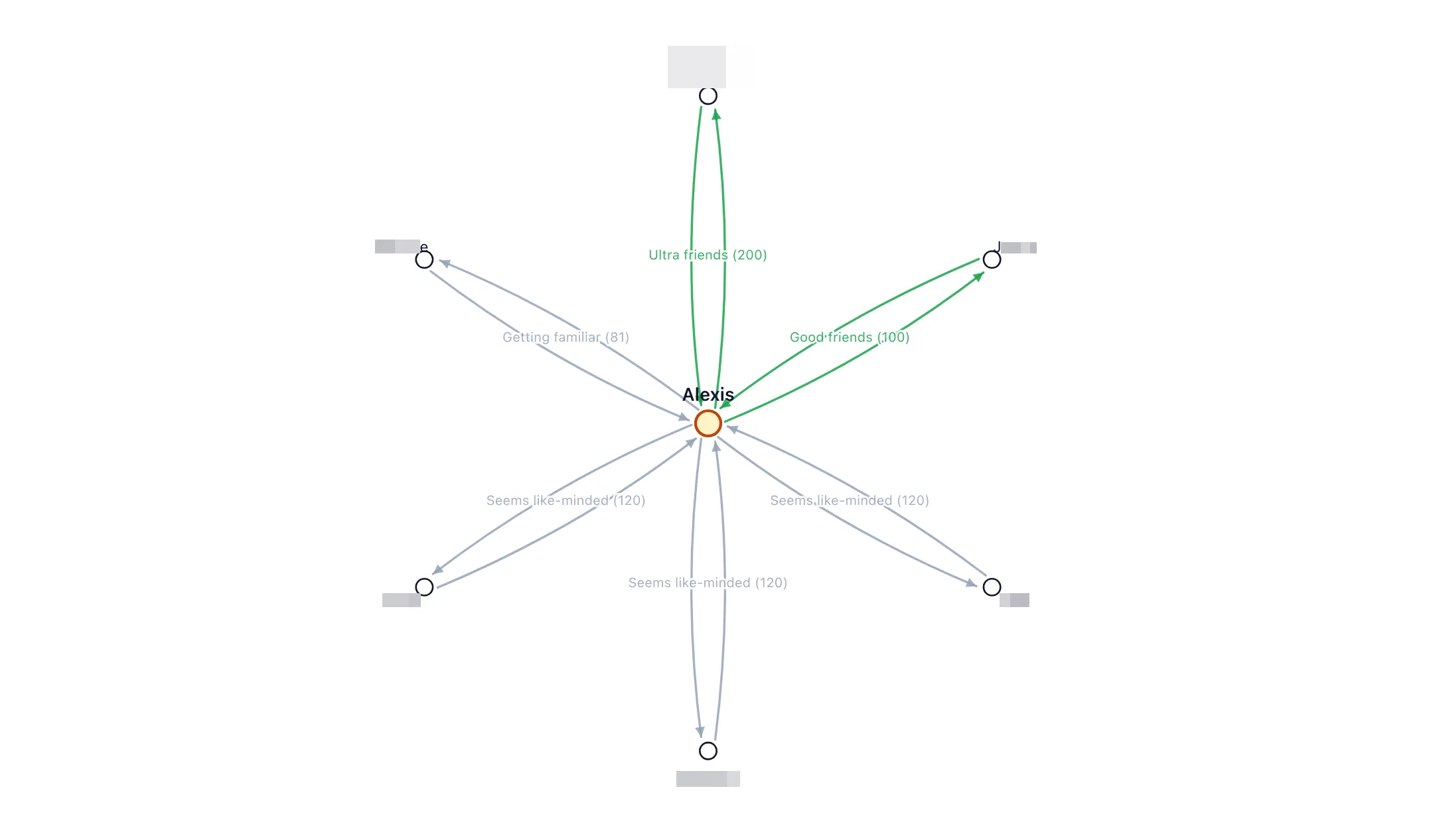
The Filter type dropdown narrows the graph to one relationship type at a time. Other (default “haven’t met”), Invalid, and unknown types are always hidden.
Housing
Section titled “Housing”The Housing sub-tab moves islanders between houses on the map. It needs Map.sav loaded, without it the panel says so and there’s nothing to do.
The page lists every house on the map with its rooms and current occupants. Unhoused Miis show in a separate Unhoused section, Find a home picks a house and room for them. If every islander is housed, the section reads Every islander has a home.
Belongings
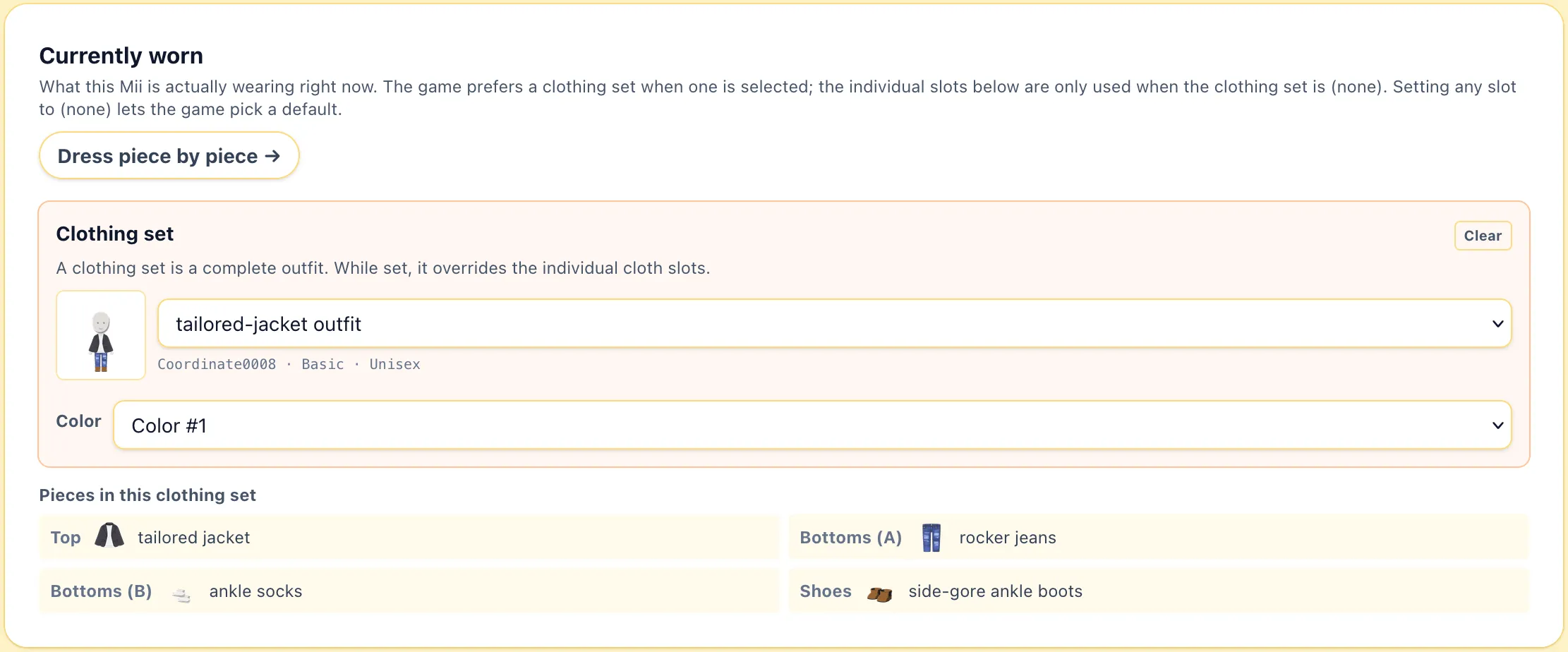
Section titled “Belongings”The Belongings sub-tab edits the Wardrobe, the Currently worn outfit, and the Pocket items of the selected Mii.
Wardrobe
Section titled “Wardrobe”The wardrobe is every individual clothing item the Mii personally owns. Each row is one garment with one toggle per color. All gives every color, None removes every color of that item.
The Category dropdown filters by clothing type (tops, bottoms, shoes, accessories, etc.), the Search box filters by name, and the Show filter narrows to All, Owned only, or Unowned only.
The Owned clothing sets section below works the same way but for clothing sets, the pre-built outfits.
Currently worn
Section titled “Currently worn”The Currently worn card is what the Mii is actually wearing right now.
Pocket items
Section titled “Pocket items”Each Mii has a fixed set of pocket slots for goods they’re carrying around. Pick a treasure or gear from the catalog to fill one, or Empty this pocket slot to clear it. Empty all slots clears everything.
Troubles
Section titled “Troubles”The Troubles sub-tab edits the in-game trouble events, the small life-events the game generates for each Mii.
Active trouble
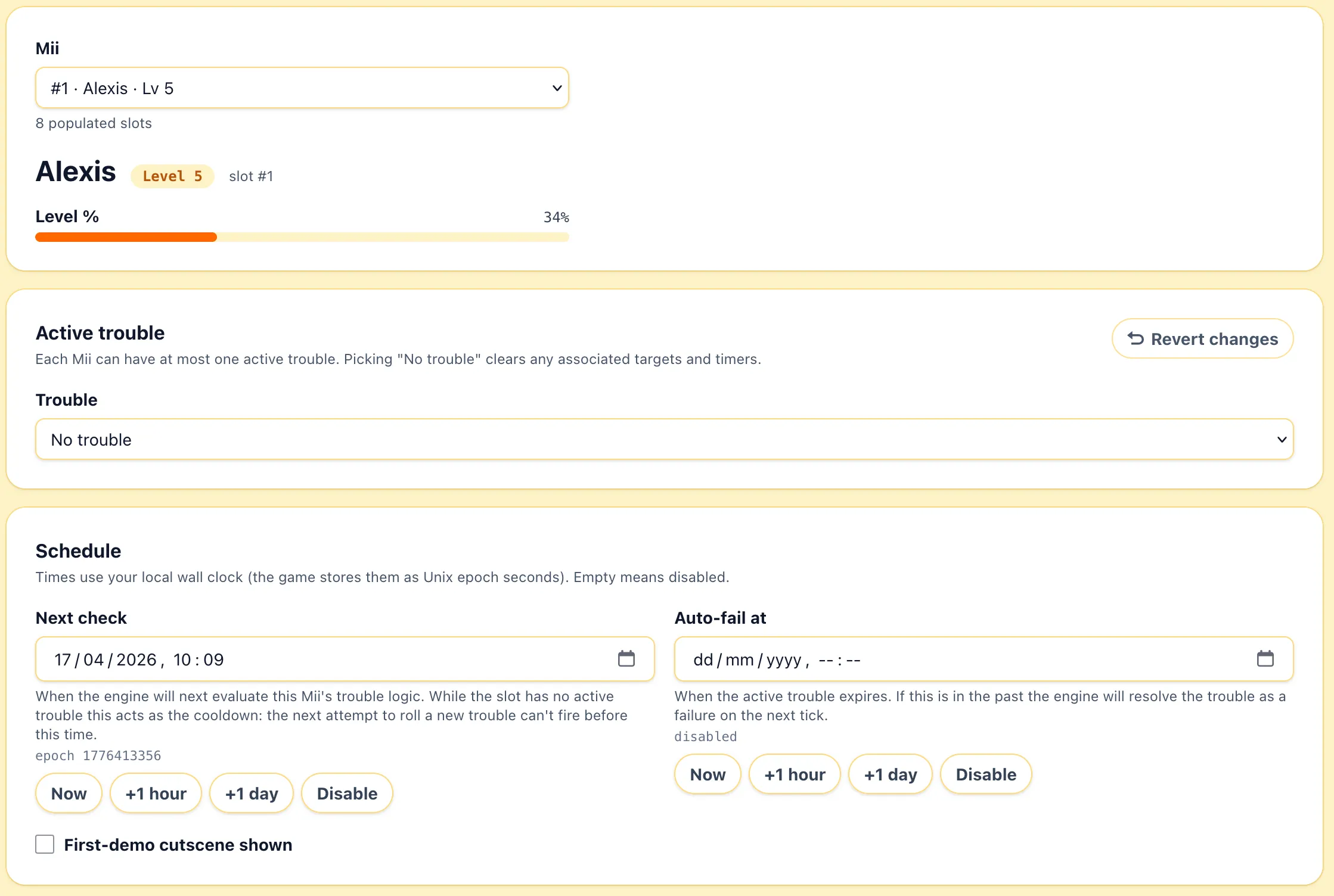
Section titled “Active trouble”Each Mii can have at most one active trouble at a time. The Active trouble picker lists every trouble type, grouped by category (Clothing, Depression, Fight, Food, Goods, Tutorial, Island edit, Other, Question, Relationships, Room style). Picking No trouble clears the trouble Id, its targets, and the schedule.
Targets
Section titled “Targets”When a trouble has targets, the editor exposes them inline: Target Mii N for relationship-style troubles, Requested clothing / Requested clothing set / Requested food / Requested treasure for request troubles…
Schedule
Section titled “Schedule”- Next check is when the engine will next evaluate this Mii’s trouble logic. While the slot has no active trouble, this acts as the cooldown.
- Auto-fail at is when the active trouble expires. If it’s in the past, the engine will resolve the trouble as a failure on the next tick.
- Now, +1 hour, +1 day are quick offsets, Reset schedule sets next check = now and auto-fail = now + the trouble’s default duration.
Cooldowns and other timers
Section titled “Cooldowns and other timers”- Child-birth blocked until is the timer the game uses to prevent back-to-back child events.
- First-demo cutscene shown marks the introductory cutscenes the Mii has already played.
Clear trouble zeroes the trouble Id, all targets, and the schedule. Revert changes restores every trouble field for this Mii to the values from the originally loaded save.
Habits
Section titled “Habits”The Habits sub-tab is the personal quirks the Mii has been given.
Advanced
Section titled “Advanced”The Advanced sub-tab is the raw entry browser for Mii.sav. Every leaf in the file is listed and editable here, including the ones the curated sub-tabs don’t expose.
Export island data
Section titled “Export island data”The Export island data drawer at the bottom of the tab writes a snapshot of every Mii and their relationships to a file you can open elsewhere. Your save isn’t modified.
- Full snapshot (JSON) dumps every editable field for every Mii and every pair.
- Miis (CSV) is one row per Mii with the headline fields.
- Relationships (CSV) is one row per directed pair.